
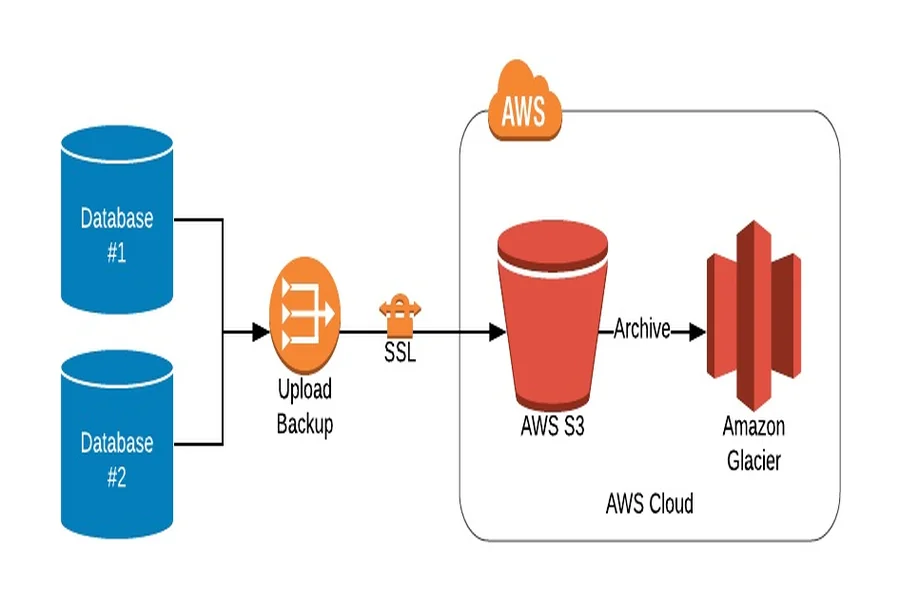
SAP HANA and S3 (Amazon Simple Storage Service) are both optimized platforms that offer a wide range of benefits to users. Hence, why does it make sense for organizations to move databases from SAP to S3? In this post, we will go into the various intricacies of the move, including why you should go for this option and the benefits of it.
However, to understand the process of SAP to S3 better, we will first explore both platforms as standalone entities.
SAP HANA
The SAP HANA (SAP High Performance Analytic Appliance) was launched in 2010 as a multi-model database platform. Its standout feature is that it stores data in its memory instead of a disk, as in traditional database systems. This enables it to process data at a speed that is faster than others in this niche.
SAP HANA also has a columnar memory that ensures that businesses can query data instantly and process massive volumes of data with very low latency. It also facilitates high-speed transactions and advanced analytics, both within the same system.
The technological attribute of SAP HANA to store data in its primary memory has many beneficial fallouts. Users can combine OLTP (Online Transactional Processing) and OLAP (Online Analytical Processing) which delivers performance at a much higher level than other Database Management Systems (DBMS).
Additionally, SAP in recent years has enhanced its analytics and data intelligence suite to cater to specific customer requirements. Its in-memory databases have become very popular for their built-in machine learning features and multi-model data management capabilities.
We will now go into the cutting-edge features of S3 and understand why, despite the advanced SAP HANA platform, users prefer to migrate databases from SAP to S3.
Amazon S3 Simple Storage Service
Amazon S3, or Simple Storage Service, is a cloud-based data warehousing platform, bringing all the benefits of a cloud environment to the table. These include flexibility, scalability, and most critically, cost-effectiveness, which together make it attractive for organizations to move databases from SAP to S3.
The trend in recent times has seen organizations increasingly adopting hybrid models of operations. This requires consolidating several ERP systems and enterprise platforms with hyperscale Clouds via APIs. One of the ways to reap the benefits of operating in a centralized and intelligent Cloud storage solution is to move databases from SAP to S3.
Why Move Databases from SAP To S3
There are two primary reasons for moving databases from SAP to S3.
Centralized intelligent storage
Businesses can leverage Amazon S3 as an effective tool for a storage layer for unstructured or structured data flows, while leaving the intelligent analytics functionality to SAP HANA. Generally, a lot of documents via business processes are generated by SAP ERP, applications and storing them in in-house databases would adversely affect the speed and performance of SAP.
Data integration
Businesses can integrate data from non-SAP sources by moving data from SAP to S3. By integrating data from the SAP HANA environment together with other sources, businesses can perform certain cutting-edge analytics, such as decision insights, visualizations, and revenue analysis. Moreover, database movement from SAP to S3 enables users to use advanced AWS tools, including AWS Glue, Lambda, SageMaker, Kinesis, and Redshift for data processing.
These two points make it preferable to move data from SAP to S3 to set up a SAP-certified content repository.
Benefits of Migrating Data from SAP to S3
The valuable synergies common to both SAP and S3 are here, as they have had a close and long-standing relationship, with AWS supporting SAP HANA with multiple services and infrastructure.
These include Amazon EC2 instances optimized for SAP HANA workloads, Amazon S3 (Simple Storage Service) for scalable and affordable storage, and Amazon EBS (Elastic Block Store) for high-performance storage. Other AWS services that may be used for managing SAP HANA on AWS are AWS CloudFormation, AWS Management Console, AWS SDKs, and AWS CLI.
Here are some benefits of migrating databases from SAP to S3.
Cost-Effectiveness
AWS offers fully-managed services in the cloud. Hence, by moving databases from SAP to S3, businesses save substantially on the cost of setting up and running database infrastructure, including hardware, software, implementation, and upgrade costs. The quantum of savings from hosting AWS over a five-year period is estimated to be 59 to 71 percent for SAP.
Enhanced data security
There are three ways that data security is enhanced for the SAP platform on AWS.
- SAP data on SAP is fully secured via a five-layer security ring. These are security groups, data encryption, identity and access management, data backup, and logging of activity to safeguard data.
- Access to the cloud is limited by Identity and Access Management (IAM). It controls rigidly who can have access to the data and who cannot. Data security is facilitated by the AWS KMS (Key Management Service) through the creation and management of cryptographic keys across applications.
- The AWS ecosystem offers foolproof security measures through specific tools. These are CloudTrail for logging user activity in the account, CloudWatch for monitoring operational data, and Amazon Guard Duty for detecting threats by monitoring workloads for malicious activity.
Access to Advanced AWS Tools
SAP users can avail of cloud-based technologically advanced tools when they switch databases from SAP to S3. These are Amazon Redshift for Analytics, Amazon EC2 for computing, Amazon Kinesis for processing real-time streaming data, and more. The tools can be seamlessly used with a little bit of coding.
Flexibility and Scalability
Being based in the cloud, AWS offers unlimited compute power and storage facilities. Users can scale data storage volumes as per their requirements by downloading what is required and paying for that quantum of resources only.
Conclusion
Before moving databases from SAP to S3, it is necessary to have a clear understanding of the entire SAP application scenario and how the various components interact with each other.